

If you've set up a Bitcoin payment gateway, you've probably been asked for an xPub. It sounds technical, and many merchants worry it might give someone access to their money. It doesn't. This guide explains what an xPub is, why non-custodial gateways use it, whether it's safe to share, and how to find yours in popular wallets.
What is an xPub?
An xPub (extended public key) is a single key from your Bitcoin wallet that can generate all of your wallet's receiving addresses. It's defined in the Bitcoin standard BIP-32, which describes how "hierarchical deterministic" (HD) wallets create many addresses from one seed.
Think of it like this:
- Your recovery phrase (seed) is the master key to the safe. Whoever has it can spend your Bitcoin.
- Your xPub is like a printed list of every deposit slot on the safe. People can put money in, but nobody can take money out with it.
Modern wallets often show the key with a different prefix depending on the address type, for example zpub for native SegWit addresses that start with bc1q (BIP-84). Gateways usually accept these variants too.
Why do payment gateways ask for an xPub?
Because it solves the biggest problem in accepting Bitcoin: knowing which customer paid which invoice.
If every customer pays to the same address, you end up matching payments by amount and time, which breaks as soon as two customers pay the same price. With an xPub, the gateway creates a fresh, unique address for every invoice, all belonging to your wallet. When money arrives at that address, the gateway knows exactly which invoice was paid and marks it automatically.
You also get:
- Funds straight to your wallet. The gateway never touches the money, because it can't spend it.
- Better privacy. Customers can't see your total balance or other customers' payments the way they can when everyone pays one address.
- Clean bookkeeping. One address per invoice means one clear record per payment.
This is the model Jamesinvoicing uses. You add your xPub once, and every invoice gets its own address in your wallet. Read more in our non-custodial crypto payment gateway checklist.
Is it safe to share my xPub?
An xPub cannot be used to spend your Bitcoin. That's the key point. However, it is privacy-sensitive: anyone who has it can see the addresses and transaction history of that wallet account. So:
- Only share it with a payment gateway you trust.
- Consider using a separate wallet or account just for business payments, so your xPub doesn't reveal your personal savings.
- Never share your recovery phrase or private keys. No legitimate gateway, support agent or "verification" process will ever need them.
We go deeper into this in how to secure your crypto payment gateway.
How to find your xPub
Steps vary between wallet versions, so check your wallet's own help pages if a menu looks different.
Electrum (desktop)
Open the wallet, go to Wallet → Information, and copy the "Master Public Key". See the Electrum documentation for details.
Sparrow Wallet (desktop)
Open your wallet, go to the Settings tab, and copy the xPub/zpub shown under the keystore. The Sparrow documentation has screenshots.
Hardware wallets (Ledger, Trezor and others)
Hardware wallets show the xPub inside their companion apps (for example in the account's advanced settings). Your private keys stay on the device.
Mobile wallets
Many mobile wallets don't expose an xPub. If yours doesn't, you can use a single receiving address instead, or move business payments to a wallet that supports xPub export.
Adding your xPub to Jamesinvoicing
- Sign in and go to Profile → Bitcoin settings in the dashboard.
- Paste your xPub (or zpub).
- Jamesinvoicing checks it and shows the first addresses it will generate. Compare them with the receiving addresses in your own wallet. They should match exactly.
- Send yourself a small test invoice and pay it to confirm everything works end to end.
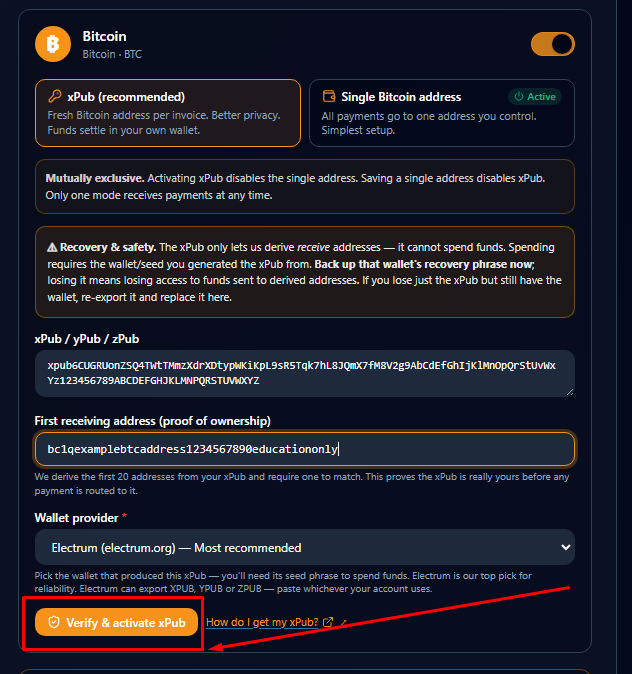
The full walkthrough with screenshots is in the installation guide.
Common xPub problems
- Addresses don't match your wallet. You may have copied the key for a different account or address type (xpub vs zpub). Re-export the key from the exact account you want to use.
- Payments arrive but your wallet doesn't show them. Your wallet may have a low "gap limit" and isn't scanning far enough ahead. Increase the gap limit in the wallet settings.
- You pasted a private key (xprv) by mistake. Stop, and move your funds to a new wallet straight away. An xprv can spend funds.
xPub vs single address: which should you use?
| xPub | Single receiving address | |
|---|---|---|
| Unique address per invoice | Yes | No |
| Automatic payment matching | Strong | Weaker (amount and time based) |
| Privacy | Better | Everyone sees the same address |
| Setup | Needs a wallet that exports xPub | Works with any wallet |
If your wallet supports it, an xPub is the better choice for any business taking more than a handful of payments.
Frequently asked questions
Can someone steal my Bitcoin with my xPub?
No. An xPub can only generate receiving addresses and view their history. Spending requires your private keys or recovery phrase.
What's the difference between xpub, ypub and zpub?
They're the same idea for different address types: legacy (xpub), nested SegWit (ypub) and native SegWit (zpub). Use the one your wallet exports for the account you want to receive into.
Do I need an xPub to accept USDT?
No. xPubs are a Bitcoin wallet feature. For USDT you add a receiving address on the right network. See our guide to accepting USDT payments.
Get paid to your own wallet
An xPub lets a gateway give every customer a unique address, match payments automatically and keep the money in your wallet, without ever being able to spend it. Start free with Jamesinvoicing and connect your xPub in a couple of minutes.