
More clients now ask to pay in USDT instead of Bitcoin. It makes sense from their side: Tether (USDT) is a stablecoin designed to track the US dollar, so the amount they send is the amount you receive, without Bitcoin's price swings. For a business, accepting USDT can be the easiest way to take crypto payments from international customers.
This guide explains how to accept USDT payments safely, which network to use, the mistakes that cost merchants money, and how to send a USDT invoice that settles straight to your own wallet.
What is USDT, in plain terms?
USDT is a token issued by Tether that aims to hold a 1:1 value with the US dollar. It does not have its own blockchain. Instead, it exists on several networks, including Tron (TRC-20), Ethereum (ERC-20) and others. You can see the current list on Tether's supported protocols page.
That detail matters more than anything else in this guide: USDT on Tron and USDT on Ethereum are not interchangeable. A payment sent on the wrong network to an address that doesn't support it can be very hard, or impossible, to recover.
TRC-20 vs ERC-20: which network should you accept?
| USDT on Tron (TRC-20) | USDT on Ethereum (ERC-20) | |
|---|---|---|
| Typical network fee | Low | Can be high when Ethereum is busy |
| Confirmation speed | Usually fast | Usually fast, depends on gas paid |
| Address format | Starts with T | Starts with 0x |
| Popular with | Freelancers, emerging markets, exchanges | DeFi users, larger transfers |
For most small and medium businesses, USDT on Tron (TRC-20) is the practical default because fees are usually low, which matters on small invoices. If your customers mostly hold USDT on Ethereum, you can offer that too. Just make sure the invoice states the network clearly. The Tron developer documentation explains how TRC-20 tokens work if you want the technical detail.
Why accept USDT instead of (or alongside) Bitcoin?
- No price risk on the invoice. A $500 invoice is still worth about $500 when it is paid.
- Global clients can pay you. Customers in countries with limited card access or expensive bank transfers often already hold USDT.
- No chargebacks. Once a blockchain payment is confirmed, the customer cannot reverse it through a bank the way a card payment can be disputed.
- You keep control. With a non-custodial setup, the funds go straight to a wallet you own instead of sitting in a processor's balance.
Many merchants offer both: Bitcoin for customers who prefer it, USDT for customers who want a dollar-stable payment. Our guide on how to accept Bitcoin payments covers the Bitcoin side.
How to accept USDT payments, step by step
1. Choose a wallet you control
Use a wallet where you hold the private keys or recovery phrase. Never share that recovery phrase with an invoicing service, a "support agent" or anyone else. A legitimate payment gateway only ever needs your receiving address, never your keys.
2. Set up your receiving address in a non-custodial gateway
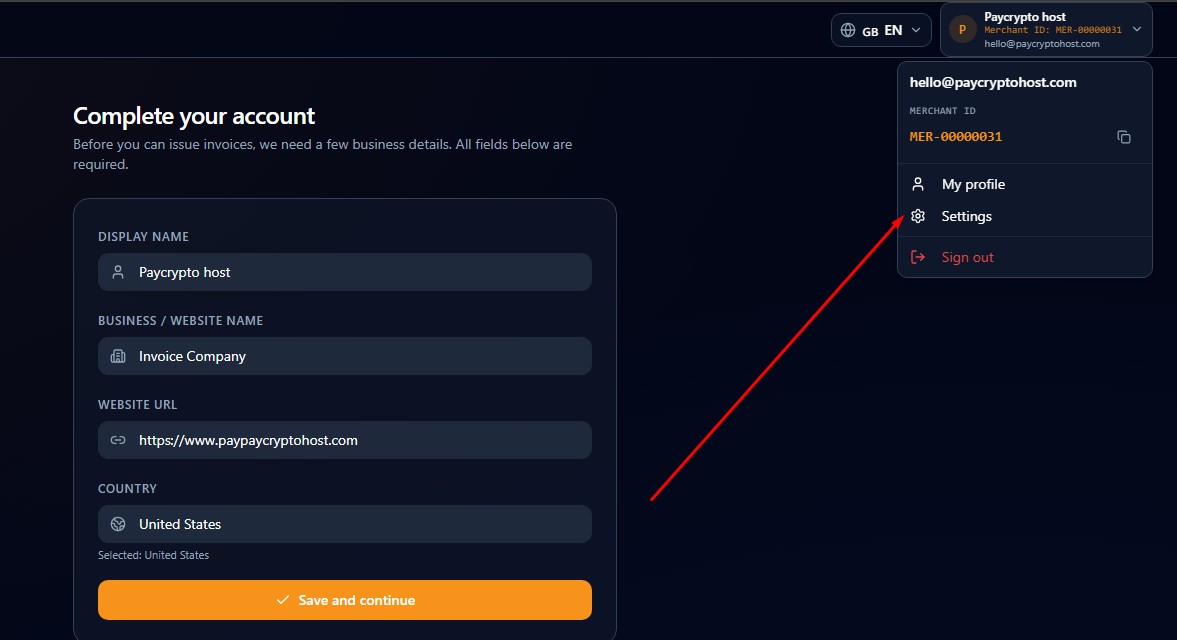
In Jamesinvoicing, you add your receiving details once in your dashboard settings. Payments then settle directly to your wallet. Jamesinvoicing never holds the funds. If you want to understand why that matters, read our non-custodial crypto payment gateway checklist.
3. Price the invoice in your own currency
Create the invoice in USD (or your local currency) and let the customer choose USDT at checkout. The invoice shows the exact USDT amount and the network to use, so the customer doesn't have to work it out.
4. Share the invoice or payment link
Send the invoice by email or share a payment link in WhatsApp, Telegram or your website. Step-by-step instructions are in our post on how to create a crypto invoice for clients.
5. Wait for confirmation, then deliver
The invoice updates automatically when the payment is detected and confirmed. Deliver the product or service only after it shows as paid. You can also look up any transaction with the free payment tracker.
Common USDT payment mistakes (and how to avoid them)
- Wrong network. The customer sends ERC-20 USDT to a TRC-20 address. Avoid it by showing the network name and address format on the invoice, and by using a payment page that only displays the correct network.
- Exchange withdrawal fees. Customers paying from an exchange sometimes have a withdrawal fee deducted, so you receive slightly less. State whether the customer must cover fees, and check for underpayments before delivering.
- Reusing one address for everyone. If every customer pays the same address, matching payments to invoices becomes guesswork. Use a gateway that tracks every invoice as its own payment request, so each payment is matched to the right order automatically.
- Fake "payment sent" screenshots. A screenshot isn't a payment. Only trust the confirmed status on your invoice or the blockchain itself.
- Ignoring record keeping. Keep the invoice, the transaction ID and the dollar value on the day you were paid. Your accountant will need them.
Is accepting USDT legal for my business?
In many countries, businesses can accept stablecoins, but tax and reporting rules vary widely. Treat USDT income like any other business income: record it at its value when received and speak to a local accountant about how your country taxes it. This article is general information, not legal or tax advice.
How much does it cost?
You pay the blockchain network fee on any later transfers you make from your wallet, and your gateway's own plan fee. Jamesinvoicing doesn't take a percentage of each payment into a custodial balance, because it never holds your funds. See the pricing page for current plans, or estimate your costs against other providers with the crypto payment gateway fee calculator.
Frequently asked questions
Can customers pay a USDT invoice from Binance or another exchange?
Yes, as long as they withdraw on the network shown on the invoice (for example TRC-20) and send the full amount after the exchange's own withdrawal fee.
What happens if a customer sends the wrong amount?
The invoice shows an underpayment or overpayment so you can ask the customer to top up, or refund the difference yourself from your wallet.
Do I need a separate wallet for Bitcoin and USDT?
Usually yes. Bitcoin and USDT on Tron use different address formats. Many popular wallets support both inside one app.
Can I accept USDT on my WordPress or WooCommerce store?
Yes. Jamesinvoicing has a plugin for that. See accept crypto on WooCommerce and the installation guide.
Start accepting USDT today
Accepting USDT is one of the simplest ways to get paid by clients around the world without price swings or chargebacks, as long as you get the network right and keep the funds in a wallet you control. Create a free Jamesinvoicing account, add your receiving wallet, and send your first USDT invoice in minutes.